> ## Documentation Index
> Fetch the complete documentation index at: https://docs.cedarcopilot.com/llms.txt
> Use this file to discover all available pages before exploring further.
# Processing agent responses
> Learn how Cedar deals with all structured objects returned from the backend.
Cedar processes your agent responses via a switch statement based on the "type" field.
This allows you to completely customize how structured responses from your agent backend are processed. This is the system through which messages are added to the chat, state actions are executed, or any decisions are made on how to deal with responses from the backend.
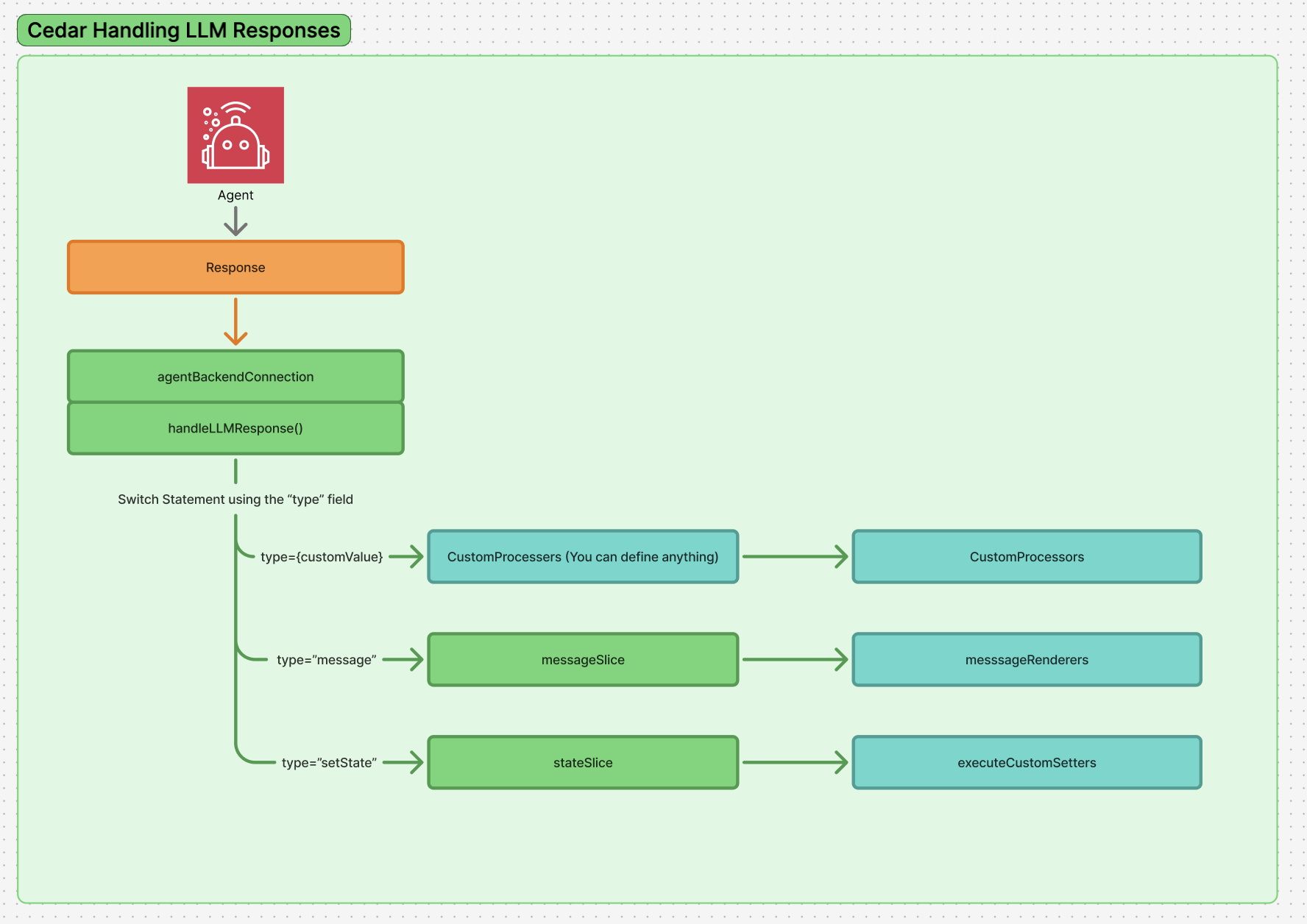 Note: This system is how we run anything user customisable, such as [Custom Message Rendering](/chat/custom-message-rendering).
## LLM Response Structure
When your agent backend returns responses, they follow the `LLMResponse` interface:
```tsx theme={null}
interface LLMResponse {
content: string; // Text content from the LLM
usage?: {
promptTokens: number;
completionTokens: number;
totalTokens: number;
};
metadata?: Record; // Additional metadata
// The object field contains structured output when using JSON Schema or Zod
object?: StructuredResponseType | StructuredResponseType[];
}
```
The **`object` field** is where Cedar looks for structured responses to process. It can contain:
* A single `StructuredResponseType` object
* An array of `StructuredResponseType` objects for multiple operations
* `undefined` if no structured output was generated
Only objects in the `object` field are processed by the response processing system. The `content` field is always added to the chat by default as a simple text message.
## Base Response Type
All structured responses in Cedar extend the `BaseStructuredResponseType` interface:
```tsx theme={null}
interface BaseStructuredResponseType {
type: string; // String identifier for processor matching
content?: string; // Optional text content
}
```
## Requirements for Custom Response Processing
To use the custom response processing system, your response objects must have a `type` field. This field determines which processor will be used to handle the response.
```tsx theme={null}
// Valid response - has required 'type' field
{
type: 'notification',
content: 'Task completed successfully',
level: 'success'
}
// Invalid - missing 'type' field
{
content: 'This response will be added as a regular message'
}
```
## Response Processor Interface
Cedar uses a strongly typed `ResponseProcessor` interface that ensures type safety throughout the processing pipeline:
```tsx theme={null}
export interface ResponseProcessor<
T extends StructuredResponseType = StructuredResponseType
> {
type: string; // Must match the response type
namespace?: string; // Optional organization namespace
execute: (obj: T, store: CedarStore) => void | Promise; // Receives narrowly typed response
validate?: (obj: StructuredResponseType) => obj is T; // Receives broadly typed response for validation
}
```
**Key typing features:**
* The `execute` function receives your **narrowly typed custom response** (e.g., `NotificationResponse`)
* The `validate` function receives the **broadly typed `StructuredResponseType`** for runtime validation
## Custom Response Type Definition
Cedar exports a `CustomStructuredResponseType` type that allows you to create type-safe custom responses:
```tsx theme={null}
import { CustomStructuredResponseType } from 'cedar-os';
// T = type string, P = additional properties
export type CustomStructuredResponseType<
T extends string,
P extends object = Record
> = BaseStructuredResponseType & { type: T } & P;
// Example usage
type NotificationResponse = CustomStructuredResponseType<
'notification',
{
level: 'info' | 'success' | 'warning' | 'error';
}
>;
type StateUpdateResponse = CustomStructuredResponseType<
'state-update',
{
key: string;
value: any;
timestamp: string;
}
>;
```
## Response Processor Factory Function
Cedar exports a `createResponseProcessor` factory function to create type-safe processors:
```tsx theme={null}
import { createResponseProcessor } from 'cedar-os';
// Create a processor with full type safety
const NotificationProcessor = createResponseProcessor({
type: 'notification',
namespace: 'my-app',
execute: (obj, store) => {
// obj is narrowly typed as NotificationResponse
showToast(obj.content, obj.level);
store.addMessage({
type: 'text',
role: 'assistant',
content: `📢 ${obj.content}`,
});
},
validate: (obj): obj is NotificationResponse => {
// obj is broadly typed as StructuredResponseType for validation
return obj.type === 'notification' && 'level' in obj;
},
});
```
## How Response Processing Works Internally
When a response comes back from the backend, Cedar uses the following process:
1. **Response Reception**: The system receives the LLM response and checks for structured objects in the `object` field
2. **Type Detection**: If an object exists, the system examines its `type` field
3. **Processor Lookup**: The system searches for a registered processor that matches the response type
4. **Validation**: If a processor is found and has a validation function, it checks if the response structure is valid
5. **Processing**: If validation passes (or no validation exists), the processor's `execute` function is called
6. **Override Behavior**: This is the ONLY thing that runs - it completely overrides default behavior, so if you want to add the message to chat, you must do so manually in your processor
## Full Implementation Examples
```tsx theme={null}
import {
createResponseProcessor,
CustomStructuredResponseType,
} from 'cedar-os';
// Define custom response type
type UnregisteredResponseType = CustomStructuredResponseType<
'unregistered_event',
{ level: string }
>;
// Create the processor
const responseProcessor = createResponseProcessor({
type: 'unregistered_event',
namespace: 'product-roadmap',
execute: (obj, store) => {
// Custom processing logic
console.log('🔥 Unregistered event', obj);
// Manually add to chat if desired
store.addMessage({
type: 'text',
role: 'assistant',
content: `Received ${obj.type} with level: ${obj.level}`,
});
},
validate: (obj): obj is UnregisteredResponseType => {
return obj.type === 'unregistered_event' && 'level' in obj;
},
});
// Register with CedarCopilot
{children}
;
```
## Default Response Types and Processors
Cedar automatically handles these response types with default behavior. Each type has a corresponding default processor:
### `"message"` Type
* **Behavior**: Adds text messages directly to chat with specified role
* **Properties**: `content: string`, `role?: 'user' | 'assistant' | 'bot'`
* **Default Processor**: `messageResponseProcessor` adds messages to chat
```tsx theme={null}
// Default messageResponseProcessor implementation
const messageResponseProcessor = {
type: 'message',
execute: (obj, store) => {
store.addMessage({
role: obj.role || 'assistant',
content: obj.content,
type: 'text',
});
},
};
```
### `"setState"` Type
* **Behavior**: Executes state actions via state setters and adds setState message to chat
* **Properties**: `stateKey: string`, `setterKey: string`, `args?: unknown`
* **Default Processor**: `setStateResponseProcessor` executes state actions and adds to chat
```tsx theme={null}
// Default setStateResponseProcessor implementation
const setStateResponseProcessor = {
type: 'setState',
namespace: 'default',
execute: async (obj, store) => {
// Execute the state action with new parameter handling
store.executeStateSetter(obj.stateKey, obj.setterKey, obj.args);
// Add setState message to chat
store.addMessage(obj as unknown as MessageInput);
},
validate: (obj): obj is SetStateResponse =>
obj.type === 'setState' &&
'stateKey' in obj &&
'setterKey' in obj &&
typeof obj.stateKey === 'string' &&
typeof obj.setterKey === 'string',
};
```
**SetState Factory Functions**: Cedar provides special factory functions for setState responses:
```tsx theme={null}
import { createSetStateResponseProcessor, SetStateResponseFor } from 'cedar-os';
// Specific setState response type using helper
type UpdateCounterResponse = SetStateResponseFor<
'counter', // StateKey
'increment', // SetterKey
{ amount: number } // Args
>;
// Create custom setState processor with filtering
const CounterSetStateProcessor =
createSetStateResponseProcessor({
namespace: 'counter',
setterKey: 'increment', // Only handle increment actions
execute: (obj, store) => {
// Custom processing logic with new parameter handling
const amount = obj.args?.amount || 1;
store.executeStateSetter('counter', 'increment', { amount });
// Custom message instead of default
store.addMessage({
type: 'text',
role: 'assistant',
content: `✅ Counter incremented by ${amount}. New value: ${
store.getState().counter.value
}`,
});
},
});
```
### `"progress_update"` Type
* **Behavior**: Updates existing progress messages or creates new ones with state tracking
* **Properties**: `text: string`, `state: 'in_progress' | 'complete' | 'error'`
* **Default Processor**: `progressUpdateResponseProcessor` manages progress message lifecycle
```tsx theme={null}
// Default progressUpdateResponseProcessor implementation
const progressUpdateResponseProcessor = {
type: 'progress_update',
execute: (obj, store) => {
const existingMessage = store.findProgressMessage(obj.text);
if (existingMessage) {
store.updateMessage(existingMessage.id, {
metadata: { ...existingMessage.metadata, state: obj.state },
});
} else {
store.addMessage({
type: 'progress_update',
role: 'assistant',
content: obj.text,
metadata: { state: obj.state },
});
}
},
};
```
### `"frontendTool"` Type
* **Behavior**: Executes registered frontend tools with full type safety and validation
* **Properties**: `toolName: string`, `args?: unknown`
* **Default Processor**: `frontendToolResponseProcessor` executes tools and adds execution message to chat
* **Learn More**: See the complete [Frontend Tools documentation](/tools/frontend-tools) for detailed implementation examples
```tsx theme={null}
// Default frontendToolResponseProcessor implementation
const frontendToolResponseProcessor = {
type: 'frontendTool',
execute: async (obj, store) => {
try {
// Execute the frontend tool with validation
const result = await store.executeFrontendTool(obj.toolName, obj.args);
// Add success message to chat
store.addMessage({
type: 'frontendTool',
role: 'assistant',
toolName: obj.toolName,
args: obj.args,
result: result,
status: 'success',
});
} catch (error) {
// Add error message to chat
store.addMessage({
type: 'frontendTool',
role: 'assistant',
toolName: obj.toolName,
args: obj.args,
error: error.message,
status: 'error',
});
}
},
validate: (obj): obj is FrontendToolResponse =>
obj.type === 'frontendTool' &&
'toolName' in obj &&
typeof obj.toolName === 'string',
};
```
### `"humanInTheLoop"` Type
* **Behavior**: Suspends workflow execution and creates interactive UI for user input/approval
* **Properties**: `status: 'suspended'`, `runId: string`, `stepPath: [string[], ...string[][]]`, `suspendPayload?: object`, `message?: string`, `timeoutMs?: number`
* **Default Processor**: `humanInTheLoopResponseProcessor` manages workflow suspension/resume lifecycle
* **Learn More**: See the complete [Human-in-the-Loop documentation](/workflows/human-in-the-loop) for detailed implementation examples
```tsx theme={null}
// Default humanInTheLoopResponseProcessor implementation
const humanInTheLoopResponseProcessor = {
type: 'humanInTheLoop',
execute: (obj, store) => {
// Store workflow suspension data in 'humanInTheLoop' state
store.registerState({
key: 'humanInTheLoop',
value: { [obj.runId]: { ...obj, suspendedAt: new Date().toISOString() } },
customSetters: {
resume: /* resume workflow logic */,
cancel: /* cancel workflow logic */
}
});
// Add interactive message with resume/cancel callbacks
store.addMessage({
type: 'humanInTheLoop',
state: 'suspended',
runId: obj.runId,
suspendPayload: obj.suspendPayload,
resumeCallback: /* typed resume function */,
cancelCallback: /* typed cancel function */
});
}
};
```
## Zod Schema Validation
Cedar exports Zod schemas for all default response processor types, enabling runtime validation and type safety:
```tsx theme={null}
import { z } from 'zod';
import {
BackendMessageResponseSchema,
SetStateResponseSchema,
LegacyActionResponseSchema,
ProgressUpdateResponseSchema,
HumanInTheLoopResponseSchema,
FrontendToolResponseSchema,
} from 'cedar-os';
// Runtime validation
const validatedResponse = HumanInTheLoopResponseSchema.parse(agentResponse);
// Type inference from schema
type HumanInTheLoopType = z.infer;
// Validate custom response objects
if (BackendMessageResponseSchema.safeParse(responseObject).success) {
// Handle as message response
}
```
**Available Zod Schemas:**
* `BackendMessageResponseSchema` - For `"message"` type responses
* `SetStateResponseSchema` - For `"setState"` type responses
* `LegacyActionResponseSchema` - For `"action"` type responses (backwards compatibility)
* `ProgressUpdateResponseSchema` - For `"progress_update"` type responses
* `HumanInTheLoopResponseSchema` - For `"humanInTheLoop"` type responses
* `FrontendToolResponseSchema` - For `"frontendTool"` type responses
If you override any of these default types, you lose the built-in behavior.
Since processors completely override default handling, ensure your custom
implementation covers all functionality you need, including adding messages to
the chat if desired.
## Recommended File Structure
Cedar encourages organizing custom processors in dedicated files for easier maintenance and debugging:
```
src/
cedar-os/
processors/
responseProcessors.ts // All custom response processors
index.ts // Export registration function
components/
Layout.tsx // Register processors with CedarCopilot
```
This structure keeps all Cedar-related logic organized under a `cedar-os` directory, making it easier to maintain, debug, and ensure consistency across your application. Remember that processors completely override default behavior, so plan your implementations to handle all the functionality you need.
Note: This system is how we run anything user customisable, such as [Custom Message Rendering](/chat/custom-message-rendering).
## LLM Response Structure
When your agent backend returns responses, they follow the `LLMResponse` interface:
```tsx theme={null}
interface LLMResponse {
content: string; // Text content from the LLM
usage?: {
promptTokens: number;
completionTokens: number;
totalTokens: number;
};
metadata?: Record; // Additional metadata
// The object field contains structured output when using JSON Schema or Zod
object?: StructuredResponseType | StructuredResponseType[];
}
```
The **`object` field** is where Cedar looks for structured responses to process. It can contain:
* A single `StructuredResponseType` object
* An array of `StructuredResponseType` objects for multiple operations
* `undefined` if no structured output was generated
Only objects in the `object` field are processed by the response processing system. The `content` field is always added to the chat by default as a simple text message.
## Base Response Type
All structured responses in Cedar extend the `BaseStructuredResponseType` interface:
```tsx theme={null}
interface BaseStructuredResponseType {
type: string; // String identifier for processor matching
content?: string; // Optional text content
}
```
## Requirements for Custom Response Processing
To use the custom response processing system, your response objects must have a `type` field. This field determines which processor will be used to handle the response.
```tsx theme={null}
// Valid response - has required 'type' field
{
type: 'notification',
content: 'Task completed successfully',
level: 'success'
}
// Invalid - missing 'type' field
{
content: 'This response will be added as a regular message'
}
```
## Response Processor Interface
Cedar uses a strongly typed `ResponseProcessor` interface that ensures type safety throughout the processing pipeline:
```tsx theme={null}
export interface ResponseProcessor<
T extends StructuredResponseType = StructuredResponseType
> {
type: string; // Must match the response type
namespace?: string; // Optional organization namespace
execute: (obj: T, store: CedarStore) => void | Promise; // Receives narrowly typed response
validate?: (obj: StructuredResponseType) => obj is T; // Receives broadly typed response for validation
}
```
**Key typing features:**
* The `execute` function receives your **narrowly typed custom response** (e.g., `NotificationResponse`)
* The `validate` function receives the **broadly typed `StructuredResponseType`** for runtime validation
## Custom Response Type Definition
Cedar exports a `CustomStructuredResponseType` type that allows you to create type-safe custom responses:
```tsx theme={null}
import { CustomStructuredResponseType } from 'cedar-os';
// T = type string, P = additional properties
export type CustomStructuredResponseType<
T extends string,
P extends object = Record
> = BaseStructuredResponseType & { type: T } & P;
// Example usage
type NotificationResponse = CustomStructuredResponseType<
'notification',
{
level: 'info' | 'success' | 'warning' | 'error';
}
>;
type StateUpdateResponse = CustomStructuredResponseType<
'state-update',
{
key: string;
value: any;
timestamp: string;
}
>;
```
## Response Processor Factory Function
Cedar exports a `createResponseProcessor` factory function to create type-safe processors:
```tsx theme={null}
import { createResponseProcessor } from 'cedar-os';
// Create a processor with full type safety
const NotificationProcessor = createResponseProcessor({
type: 'notification',
namespace: 'my-app',
execute: (obj, store) => {
// obj is narrowly typed as NotificationResponse
showToast(obj.content, obj.level);
store.addMessage({
type: 'text',
role: 'assistant',
content: `📢 ${obj.content}`,
});
},
validate: (obj): obj is NotificationResponse => {
// obj is broadly typed as StructuredResponseType for validation
return obj.type === 'notification' && 'level' in obj;
},
});
```
## How Response Processing Works Internally
When a response comes back from the backend, Cedar uses the following process:
1. **Response Reception**: The system receives the LLM response and checks for structured objects in the `object` field
2. **Type Detection**: If an object exists, the system examines its `type` field
3. **Processor Lookup**: The system searches for a registered processor that matches the response type
4. **Validation**: If a processor is found and has a validation function, it checks if the response structure is valid
5. **Processing**: If validation passes (or no validation exists), the processor's `execute` function is called
6. **Override Behavior**: This is the ONLY thing that runs - it completely overrides default behavior, so if you want to add the message to chat, you must do so manually in your processor
## Full Implementation Examples
```tsx theme={null}
import {
createResponseProcessor,
CustomStructuredResponseType,
} from 'cedar-os';
// Define custom response type
type UnregisteredResponseType = CustomStructuredResponseType<
'unregistered_event',
{ level: string }
>;
// Create the processor
const responseProcessor = createResponseProcessor({
type: 'unregistered_event',
namespace: 'product-roadmap',
execute: (obj, store) => {
// Custom processing logic
console.log('🔥 Unregistered event', obj);
// Manually add to chat if desired
store.addMessage({
type: 'text',
role: 'assistant',
content: `Received ${obj.type} with level: ${obj.level}`,
});
},
validate: (obj): obj is UnregisteredResponseType => {
return obj.type === 'unregistered_event' && 'level' in obj;
},
});
// Register with CedarCopilot
{children}
;
```
## Default Response Types and Processors
Cedar automatically handles these response types with default behavior. Each type has a corresponding default processor:
### `"message"` Type
* **Behavior**: Adds text messages directly to chat with specified role
* **Properties**: `content: string`, `role?: 'user' | 'assistant' | 'bot'`
* **Default Processor**: `messageResponseProcessor` adds messages to chat
```tsx theme={null}
// Default messageResponseProcessor implementation
const messageResponseProcessor = {
type: 'message',
execute: (obj, store) => {
store.addMessage({
role: obj.role || 'assistant',
content: obj.content,
type: 'text',
});
},
};
```
### `"setState"` Type
* **Behavior**: Executes state actions via state setters and adds setState message to chat
* **Properties**: `stateKey: string`, `setterKey: string`, `args?: unknown`
* **Default Processor**: `setStateResponseProcessor` executes state actions and adds to chat
```tsx theme={null}
// Default setStateResponseProcessor implementation
const setStateResponseProcessor = {
type: 'setState',
namespace: 'default',
execute: async (obj, store) => {
// Execute the state action with new parameter handling
store.executeStateSetter(obj.stateKey, obj.setterKey, obj.args);
// Add setState message to chat
store.addMessage(obj as unknown as MessageInput);
},
validate: (obj): obj is SetStateResponse =>
obj.type === 'setState' &&
'stateKey' in obj &&
'setterKey' in obj &&
typeof obj.stateKey === 'string' &&
typeof obj.setterKey === 'string',
};
```
**SetState Factory Functions**: Cedar provides special factory functions for setState responses:
```tsx theme={null}
import { createSetStateResponseProcessor, SetStateResponseFor } from 'cedar-os';
// Specific setState response type using helper
type UpdateCounterResponse = SetStateResponseFor<
'counter', // StateKey
'increment', // SetterKey
{ amount: number } // Args
>;
// Create custom setState processor with filtering
const CounterSetStateProcessor =
createSetStateResponseProcessor({
namespace: 'counter',
setterKey: 'increment', // Only handle increment actions
execute: (obj, store) => {
// Custom processing logic with new parameter handling
const amount = obj.args?.amount || 1;
store.executeStateSetter('counter', 'increment', { amount });
// Custom message instead of default
store.addMessage({
type: 'text',
role: 'assistant',
content: `✅ Counter incremented by ${amount}. New value: ${
store.getState().counter.value
}`,
});
},
});
```
### `"progress_update"` Type
* **Behavior**: Updates existing progress messages or creates new ones with state tracking
* **Properties**: `text: string`, `state: 'in_progress' | 'complete' | 'error'`
* **Default Processor**: `progressUpdateResponseProcessor` manages progress message lifecycle
```tsx theme={null}
// Default progressUpdateResponseProcessor implementation
const progressUpdateResponseProcessor = {
type: 'progress_update',
execute: (obj, store) => {
const existingMessage = store.findProgressMessage(obj.text);
if (existingMessage) {
store.updateMessage(existingMessage.id, {
metadata: { ...existingMessage.metadata, state: obj.state },
});
} else {
store.addMessage({
type: 'progress_update',
role: 'assistant',
content: obj.text,
metadata: { state: obj.state },
});
}
},
};
```
### `"frontendTool"` Type
* **Behavior**: Executes registered frontend tools with full type safety and validation
* **Properties**: `toolName: string`, `args?: unknown`
* **Default Processor**: `frontendToolResponseProcessor` executes tools and adds execution message to chat
* **Learn More**: See the complete [Frontend Tools documentation](/tools/frontend-tools) for detailed implementation examples
```tsx theme={null}
// Default frontendToolResponseProcessor implementation
const frontendToolResponseProcessor = {
type: 'frontendTool',
execute: async (obj, store) => {
try {
// Execute the frontend tool with validation
const result = await store.executeFrontendTool(obj.toolName, obj.args);
// Add success message to chat
store.addMessage({
type: 'frontendTool',
role: 'assistant',
toolName: obj.toolName,
args: obj.args,
result: result,
status: 'success',
});
} catch (error) {
// Add error message to chat
store.addMessage({
type: 'frontendTool',
role: 'assistant',
toolName: obj.toolName,
args: obj.args,
error: error.message,
status: 'error',
});
}
},
validate: (obj): obj is FrontendToolResponse =>
obj.type === 'frontendTool' &&
'toolName' in obj &&
typeof obj.toolName === 'string',
};
```
### `"humanInTheLoop"` Type
* **Behavior**: Suspends workflow execution and creates interactive UI for user input/approval
* **Properties**: `status: 'suspended'`, `runId: string`, `stepPath: [string[], ...string[][]]`, `suspendPayload?: object`, `message?: string`, `timeoutMs?: number`
* **Default Processor**: `humanInTheLoopResponseProcessor` manages workflow suspension/resume lifecycle
* **Learn More**: See the complete [Human-in-the-Loop documentation](/workflows/human-in-the-loop) for detailed implementation examples
```tsx theme={null}
// Default humanInTheLoopResponseProcessor implementation
const humanInTheLoopResponseProcessor = {
type: 'humanInTheLoop',
execute: (obj, store) => {
// Store workflow suspension data in 'humanInTheLoop' state
store.registerState({
key: 'humanInTheLoop',
value: { [obj.runId]: { ...obj, suspendedAt: new Date().toISOString() } },
customSetters: {
resume: /* resume workflow logic */,
cancel: /* cancel workflow logic */
}
});
// Add interactive message with resume/cancel callbacks
store.addMessage({
type: 'humanInTheLoop',
state: 'suspended',
runId: obj.runId,
suspendPayload: obj.suspendPayload,
resumeCallback: /* typed resume function */,
cancelCallback: /* typed cancel function */
});
}
};
```
## Zod Schema Validation
Cedar exports Zod schemas for all default response processor types, enabling runtime validation and type safety:
```tsx theme={null}
import { z } from 'zod';
import {
BackendMessageResponseSchema,
SetStateResponseSchema,
LegacyActionResponseSchema,
ProgressUpdateResponseSchema,
HumanInTheLoopResponseSchema,
FrontendToolResponseSchema,
} from 'cedar-os';
// Runtime validation
const validatedResponse = HumanInTheLoopResponseSchema.parse(agentResponse);
// Type inference from schema
type HumanInTheLoopType = z.infer;
// Validate custom response objects
if (BackendMessageResponseSchema.safeParse(responseObject).success) {
// Handle as message response
}
```
**Available Zod Schemas:**
* `BackendMessageResponseSchema` - For `"message"` type responses
* `SetStateResponseSchema` - For `"setState"` type responses
* `LegacyActionResponseSchema` - For `"action"` type responses (backwards compatibility)
* `ProgressUpdateResponseSchema` - For `"progress_update"` type responses
* `HumanInTheLoopResponseSchema` - For `"humanInTheLoop"` type responses
* `FrontendToolResponseSchema` - For `"frontendTool"` type responses
If you override any of these default types, you lose the built-in behavior.
Since processors completely override default handling, ensure your custom
implementation covers all functionality you need, including adding messages to
the chat if desired.
## Recommended File Structure
Cedar encourages organizing custom processors in dedicated files for easier maintenance and debugging:
```
src/
cedar-os/
processors/
responseProcessors.ts // All custom response processors
index.ts // Export registration function
components/
Layout.tsx // Register processors with CedarCopilot
```
This structure keeps all Cedar-related logic organized under a `cedar-os` directory, making it easier to maintain, debug, and ensure consistency across your application. Remember that processors completely override default behavior, so plan your implementations to handle all the functionality you need.