> ## Documentation Index
> Fetch the complete documentation index at: https://docs.cedarcopilot.com/llms.txt
> Use this file to discover all available pages before exploring further.
# Cedar-OS Internals (advanced)
> A deep dive into Cedar-OS internal architecture
This is for those who are interested in advanced use cases or contributing. If you just want to get started, please go to [Getting Started](/getting-started/getting-started). We recommend you come back to this once you have a working chat and are building custom AI workflows.
We'll go through an overview of the core modules, and then how we built the internal sendMessage() function that composes all the slices into end to end flows.
## The Zustand Store Structure
Cedar-OS uses [Zustand](https://zustand-demo.pmnd.rs/) as its core state management solution, organized into specialized "slices" that each handle different aspects of the system. This allows us to modularise and encapsulate functionality internally to modules.
### Core Slices Overview
```typescript theme={null}
// The complete Cedar store combines all slices
interface CedarStore =
// core modules
& AgentConnectionSlice // LLM communication & response processing
& StateSlice // Allows the agent to read & write to the state
& AgentContextSlice // Allows us to control the context we send to the agent, including state ^
& MessagesSlice // Chat message storage & rendering
& ToolsSlice // Frontend tool registration & execution
// additional modules
& SpellSlice // Interactive UI components ("spells")
& StylingSlice // Theme & appearance
& VoiceSlice // Voice interaction
& DebuggerSlice // Development tools
```
**`AgentConnectionSlice`** - Handles all LLM communication and response processing
**`StateSlice`** - Allows agents to read and write to local react states
**`AgentContextSlice`** - Gathers and formats context (such as state) for AI consumption
**`MessagesSlice`** - Stores and renders chat messages
**`ToolsSlice`** - Manages frontend tool registration, execution, and lifecycle
## Breaking down an end-to-end AI workflow with Cedar-OS
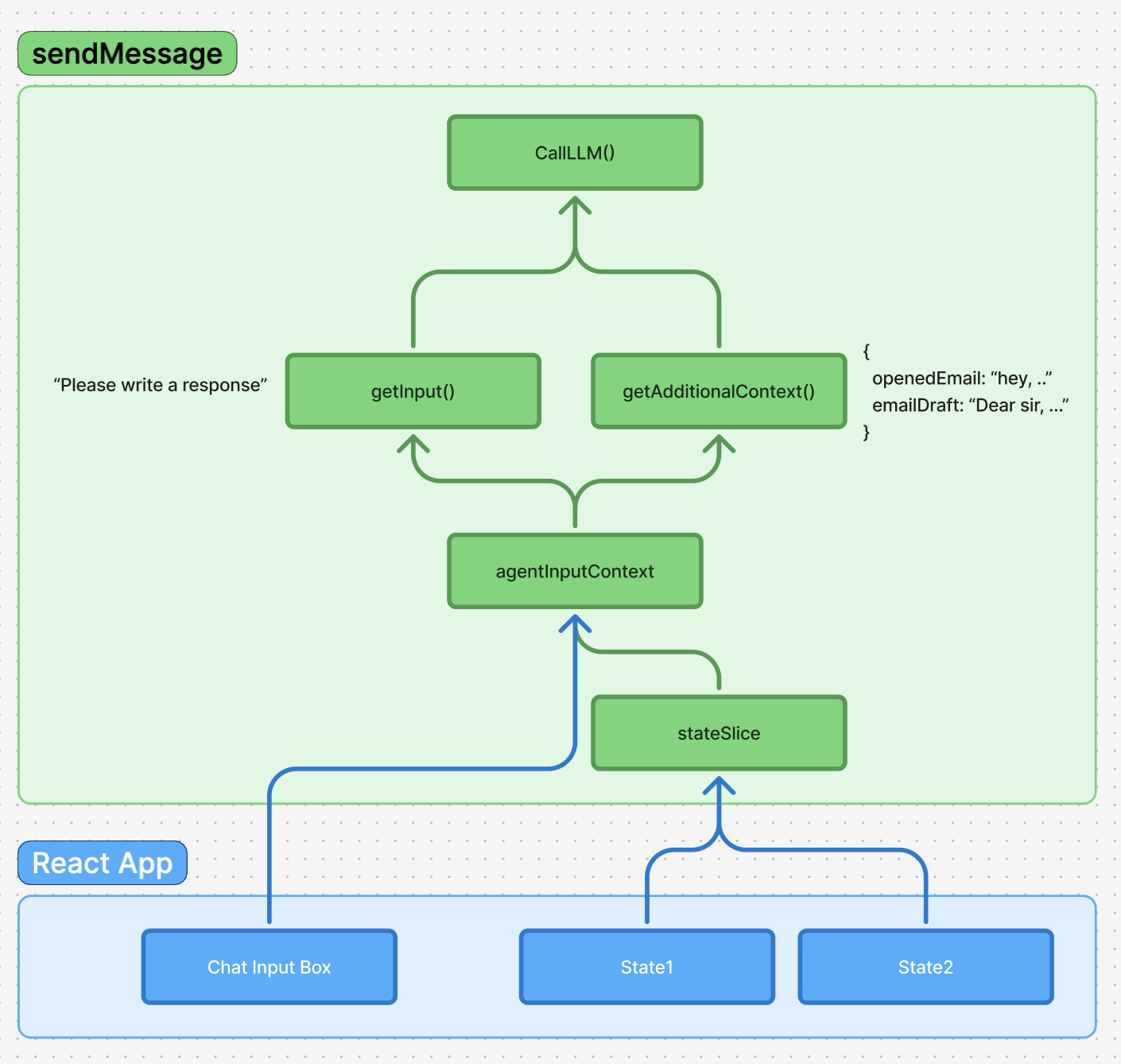
Let's say you want to build this an AI-native email flow where you can say "Write a response" and have an AI agent compose a draft to respond to the currently opened email.
### Preparing the input
**1. The first you'd do is pass in the user ask: "Write a response" to an LLM.**
This part is easy. We get the user request and pass it in as prompt.
**2. Now we should add the user input as a message**
We call `addMessage` from `messagesSlice` to persist and add the user message to chat history.
**3. Let agent read state through `stateSlice`**
But now, how does the agent know what it's supposed to write a response to? Our next step is to allow the agent to read from local states.
To do this, we have `stateSlice` which provides functions like `registerState`. This lets us register a state into a central place no matter where and how the local states are distributed.
**4. agentContext**
agentContext handles the context that we pass into the agent. It compiles the context & editor through `stringifyInputContext` and `compileAdditionalContext` and helps generally manage the context we're giving the agent.
For example, it allows users to use @notation to mention a specific email or user through `useStateBasedMentionProvider()`.
**5. callLLM()**
Now that we've pulled all the necessary context for the agent to execute its task effectively, we can pass it all in through the `agentConnectionSlice` which calls the LLM.
### Handling the LLM response
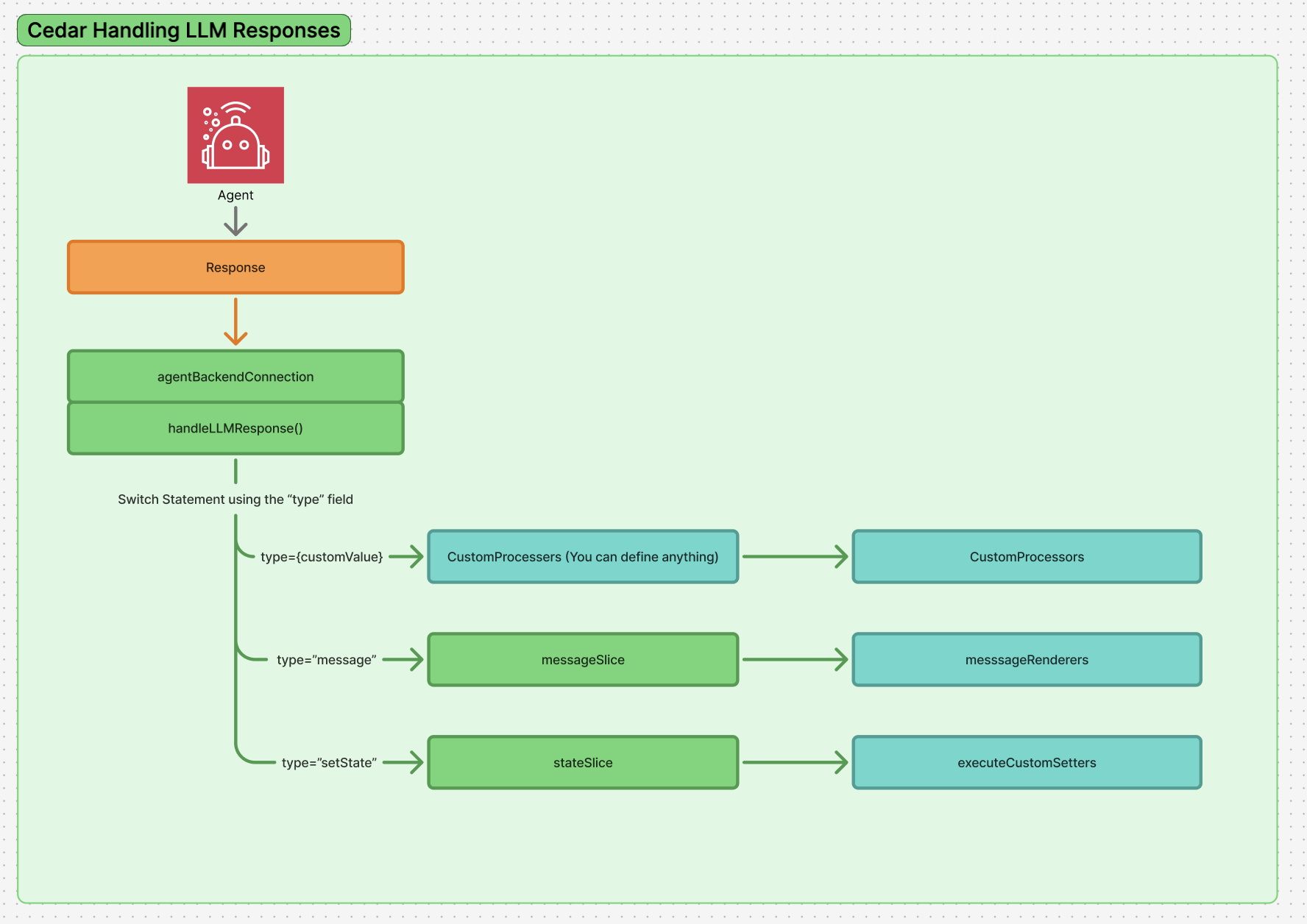
Once we get a response from the LLM, Cedar-OS processes it through a structured pipeline that handles both text content and structured actions.
**1. Response routing through `handleLLMResponse`**
When the LLM returns a response, it gets passed to `handleLLMResponse()` which processes an array of items that can be either strings (text content) or structured objects.
**2. Type-based processing with response processors**
The system uses a switch-like mechanism through `processStructuredResponse()` that looks at the `type` field of structured responses and routes them to registered response processors:
* **`message` type** - Handled by `messageResponseProcessor`, converts backend message format to chat messages
* **`setState` type** - Handled by `setStateResponseProcessor`, executes state mutations through `executeStateSetter()`
* **`frontendTool` type** - Handled by `frontendToolResponseProcessor`, executes registered frontend tools
* **`progress_update` type** - Shows loading states and progress indicators
**3. Adding to chat through `messagesSlice`**
Text content and processed messages get added to the chat history via `addMessage()` in the `messagesSlice`. This handles the display and persistence of conversation history.
**4. State mutations through registered setters**
For `setState` type responses, the system calls `executeStateSetter()` which uses the parameters from `registerState()` to execute the appropriate state setter function, allowing the AI to modify application state based on the registered schema and available setters.
For `frontendTool` type responses, the system calls `executeFrontendTool()` which validates arguments against registered Zod schemas and executes the appropriate tool function, enabling agents to interact with UI components and perform frontend actions.
***
## Response Processors Deep Dive
Response processors handle different types of structured AI responses:
### Built-in Processors
1. **SetStateResponseProcessor** - Executes state mutations via registered state setters
2. **MessageResponseProcessor** - Adds text messages to chat
3. **FrontendToolResponseProcessor** - Executes registered frontend tools with validation
4. **ProgressUpdateResponseProcessor** - Handles loading states
### Custom Response Processors
```typescript theme={null}
import { createResponseProcessor } from 'cedar-os';
const emailResponseProcessor = createResponseProcessor({
type: 'email_action',
namespace: 'email',
execute: async (obj, store) => {
if (obj.action === 'send') {
await sendEmail(obj.draftId);
store.addMessage({
role: 'assistant',
type: 'text',
content: `Email sent successfully!`,
});
}
},
validate: (obj) => obj.type === 'email_action',
});
// Register the processor
store.registerResponseProcessor(emailResponseProcessor);
```
### Frontend Tool Processing Example
```typescript theme={null}
// Frontend tool registration happens in components
import { useRegisterFrontendTool } from 'cedar-os';
import { z } from 'zod';
function EmailComponent() {
useRegisterFrontendTool({
name: 'sendEmail',
description: 'Send an email with the provided content',
argsSchema: z.object({
to: z.string().email(),
subject: z.string(),
body: z.string(),
}),
execute: async (args) => {
const result = await sendEmail(args.to, args.subject, args.body);
return { success: true, messageId: result.id };
},
});
return
 **1. The first you'd do is pass in the user ask: "Write a response" to an LLM.**
This part is easy. We get the user request and pass it in as prompt.
**2. Now we should add the user input as a message**
We call `addMessage` from `messagesSlice` to persist and add the user message to chat history.
**3. Let agent read state through `stateSlice`**
But now, how does the agent know what it's supposed to write a response to? Our next step is to allow the agent to read from local states.
To do this, we have `stateSlice` which provides functions like `registerState`. This lets us register a state into a central place no matter where and how the local states are distributed.
**4. agentContext**
agentContext handles the context that we pass into the agent. It compiles the context & editor through `stringifyInputContext` and `compileAdditionalContext` and helps generally manage the context we're giving the agent.
For example, it allows users to use @notation to mention a specific email or user through `useStateBasedMentionProvider()`.
**5. callLLM()**
Now that we've pulled all the necessary context for the agent to execute its task effectively, we can pass it all in through the `agentConnectionSlice` which calls the LLM.
### Handling the LLM response
**1. The first you'd do is pass in the user ask: "Write a response" to an LLM.**
This part is easy. We get the user request and pass it in as prompt.
**2. Now we should add the user input as a message**
We call `addMessage` from `messagesSlice` to persist and add the user message to chat history.
**3. Let agent read state through `stateSlice`**
But now, how does the agent know what it's supposed to write a response to? Our next step is to allow the agent to read from local states.
To do this, we have `stateSlice` which provides functions like `registerState`. This lets us register a state into a central place no matter where and how the local states are distributed.
**4. agentContext**
agentContext handles the context that we pass into the agent. It compiles the context & editor through `stringifyInputContext` and `compileAdditionalContext` and helps generally manage the context we're giving the agent.
For example, it allows users to use @notation to mention a specific email or user through `useStateBasedMentionProvider()`.
**5. callLLM()**
Now that we've pulled all the necessary context for the agent to execute its task effectively, we can pass it all in through the `agentConnectionSlice` which calls the LLM.
### Handling the LLM response
 Once we get a response from the LLM, Cedar-OS processes it through a structured pipeline that handles both text content and structured actions.
**1. Response routing through `handleLLMResponse`**
When the LLM returns a response, it gets passed to `handleLLMResponse()` which processes an array of items that can be either strings (text content) or structured objects.
**2. Type-based processing with response processors**
The system uses a switch-like mechanism through `processStructuredResponse()` that looks at the `type` field of structured responses and routes them to registered response processors:
* **`message` type** - Handled by `messageResponseProcessor`, converts backend message format to chat messages
* **`setState` type** - Handled by `setStateResponseProcessor`, executes state mutations through `executeStateSetter()`
* **`frontendTool` type** - Handled by `frontendToolResponseProcessor`, executes registered frontend tools
* **`progress_update` type** - Shows loading states and progress indicators
**3. Adding to chat through `messagesSlice`**
Text content and processed messages get added to the chat history via `addMessage()` in the `messagesSlice`. This handles the display and persistence of conversation history.
**4. State mutations through registered setters**
For `setState` type responses, the system calls `executeStateSetter()` which uses the parameters from `registerState()` to execute the appropriate state setter function, allowing the AI to modify application state based on the registered schema and available setters.
For `frontendTool` type responses, the system calls `executeFrontendTool()` which validates arguments against registered Zod schemas and executes the appropriate tool function, enabling agents to interact with UI components and perform frontend actions.
***
## Response Processors Deep Dive
Response processors handle different types of structured AI responses:
### Built-in Processors
1. **SetStateResponseProcessor** - Executes state mutations via registered state setters
2. **MessageResponseProcessor** - Adds text messages to chat
3. **FrontendToolResponseProcessor** - Executes registered frontend tools with validation
4. **ProgressUpdateResponseProcessor** - Handles loading states
### Custom Response Processors
```typescript theme={null}
import { createResponseProcessor } from 'cedar-os';
const emailResponseProcessor = createResponseProcessor({
type: 'email_action',
namespace: 'email',
execute: async (obj, store) => {
if (obj.action === 'send') {
await sendEmail(obj.draftId);
store.addMessage({
role: 'assistant',
type: 'text',
content: `Email sent successfully!`,
});
}
},
validate: (obj) => obj.type === 'email_action',
});
// Register the processor
store.registerResponseProcessor(emailResponseProcessor);
```
### Frontend Tool Processing Example
```typescript theme={null}
// Frontend tool registration happens in components
import { useRegisterFrontendTool } from 'cedar-os';
import { z } from 'zod';
function EmailComponent() {
useRegisterFrontendTool({
name: 'sendEmail',
description: 'Send an email with the provided content',
argsSchema: z.object({
to: z.string().email(),
subject: z.string(),
body: z.string(),
}),
execute: async (args) => {
const result = await sendEmail(args.to, args.subject, args.body);
return { success: true, messageId: result.id };
},
});
return
Once we get a response from the LLM, Cedar-OS processes it through a structured pipeline that handles both text content and structured actions.
**1. Response routing through `handleLLMResponse`**
When the LLM returns a response, it gets passed to `handleLLMResponse()` which processes an array of items that can be either strings (text content) or structured objects.
**2. Type-based processing with response processors**
The system uses a switch-like mechanism through `processStructuredResponse()` that looks at the `type` field of structured responses and routes them to registered response processors:
* **`message` type** - Handled by `messageResponseProcessor`, converts backend message format to chat messages
* **`setState` type** - Handled by `setStateResponseProcessor`, executes state mutations through `executeStateSetter()`
* **`frontendTool` type** - Handled by `frontendToolResponseProcessor`, executes registered frontend tools
* **`progress_update` type** - Shows loading states and progress indicators
**3. Adding to chat through `messagesSlice`**
Text content and processed messages get added to the chat history via `addMessage()` in the `messagesSlice`. This handles the display and persistence of conversation history.
**4. State mutations through registered setters**
For `setState` type responses, the system calls `executeStateSetter()` which uses the parameters from `registerState()` to execute the appropriate state setter function, allowing the AI to modify application state based on the registered schema and available setters.
For `frontendTool` type responses, the system calls `executeFrontendTool()` which validates arguments against registered Zod schemas and executes the appropriate tool function, enabling agents to interact with UI components and perform frontend actions.
***
## Response Processors Deep Dive
Response processors handle different types of structured AI responses:
### Built-in Processors
1. **SetStateResponseProcessor** - Executes state mutations via registered state setters
2. **MessageResponseProcessor** - Adds text messages to chat
3. **FrontendToolResponseProcessor** - Executes registered frontend tools with validation
4. **ProgressUpdateResponseProcessor** - Handles loading states
### Custom Response Processors
```typescript theme={null}
import { createResponseProcessor } from 'cedar-os';
const emailResponseProcessor = createResponseProcessor({
type: 'email_action',
namespace: 'email',
execute: async (obj, store) => {
if (obj.action === 'send') {
await sendEmail(obj.draftId);
store.addMessage({
role: 'assistant',
type: 'text',
content: `Email sent successfully!`,
});
}
},
validate: (obj) => obj.type === 'email_action',
});
// Register the processor
store.registerResponseProcessor(emailResponseProcessor);
```
### Frontend Tool Processing Example
```typescript theme={null}
// Frontend tool registration happens in components
import { useRegisterFrontendTool } from 'cedar-os';
import { z } from 'zod';
function EmailComponent() {
useRegisterFrontendTool({
name: 'sendEmail',
description: 'Send an email with the provided content',
argsSchema: z.object({
to: z.string().email(),
subject: z.string(),
body: z.string(),
}),
execute: async (args) => {
const result = await sendEmail(args.to, args.subject, args.body);
return { success: true, messageId: result.id };
},
});
return