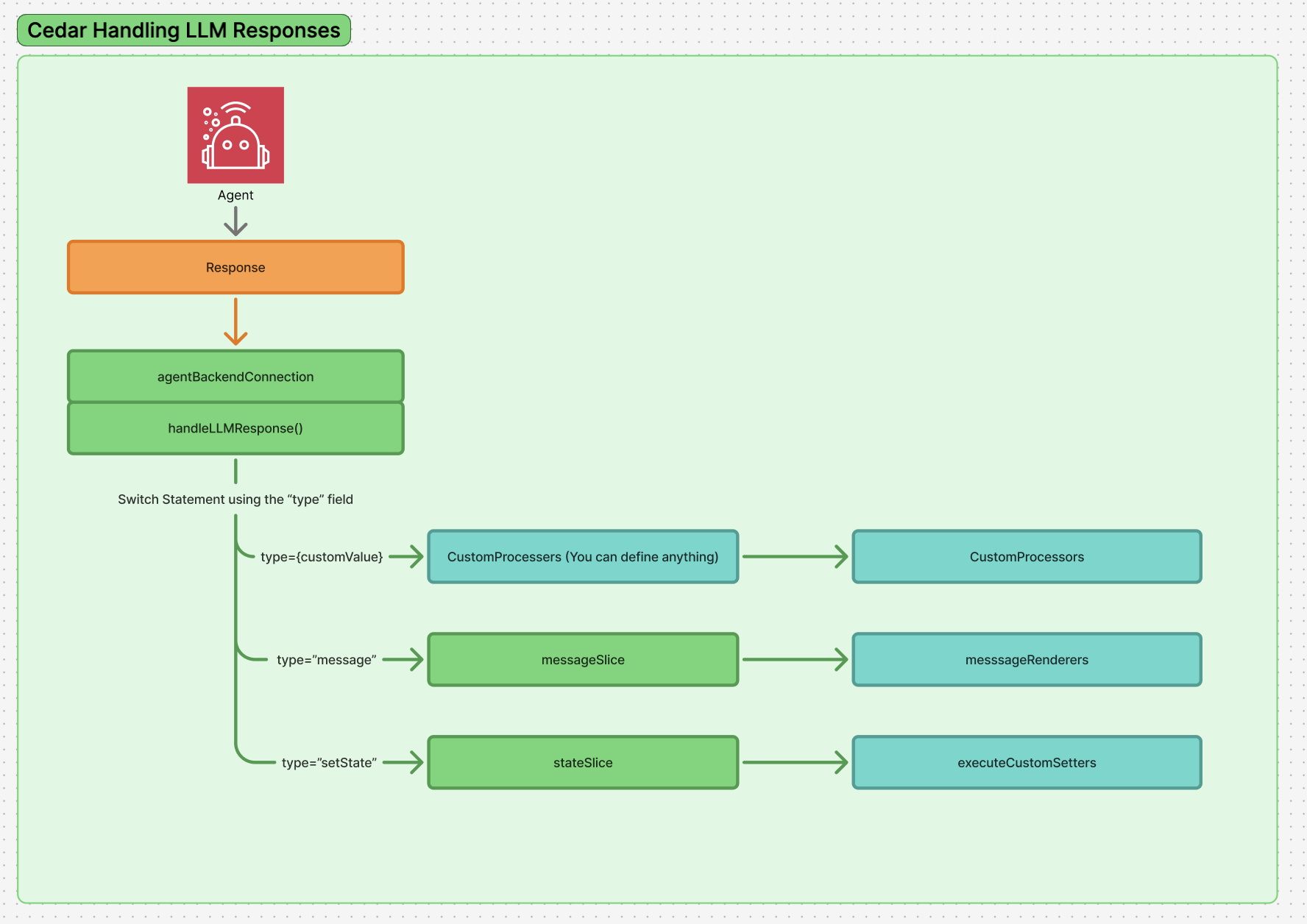
Learn how Cedar deals with all structured objects returned from the backend.
Cedar processes your agent responses via a switch statement based on the “type” field.This allows you to completely customize how structured responses from your agent backend are processed. This is the system through which messages are added to the chat, state actions are executed, or any decisions are made on how to deal with responses from the backend.Note: This system is how we run anything user customisable, such as Custom Message Rendering.
When your agent backend returns responses, they follow the LLMResponse interface:
interface LLMResponse { content: string; // Text content from the LLM usage?: { promptTokens: number; completionTokens: number; totalTokens: number; }; metadata?: Record<string, unknown>; // Additional metadata // The object field contains structured output when using JSON Schema or Zod object?: StructuredResponseType | StructuredResponseType[];}
The object field is where Cedar looks for structured responses to process. It can contain:
A single StructuredResponseType object
An array of StructuredResponseType objects for multiple operations
undefined if no structured output was generated
Only objects in the object field are processed by the response processing system. The content field is always added to the chat by default as a simple text message.
To use the custom response processing system, your response objects must have a type field. This field determines which processor will be used to handle the response.
// Valid response - has required 'type' field{ type: 'notification', content: 'Task completed successfully', level: 'success'}// Invalid - missing 'type' field{ content: 'This response will be added as a regular message'}
When a response comes back from the backend, Cedar uses the following process:
Response Reception: The system receives the LLM response and checks for structured objects in the object field
Type Detection: If an object exists, the system examines its type field
Processor Lookup: The system searches for a registered processor that matches the response type
Validation: If a processor is found and has a validation function, it checks if the response structure is valid
Processing: If validation passes (or no validation exists), the processor’s execute function is called
Override Behavior: This is the ONLY thing that runs - it completely overrides default behavior, so if you want to add the message to chat, you must do so manually in your processor
Cedar exports Zod schemas for all default response processor types, enabling runtime validation and type safety:
import { z } from 'zod';import { BackendMessageResponseSchema, SetStateResponseSchema, LegacyActionResponseSchema, ProgressUpdateResponseSchema, HumanInTheLoopResponseSchema, FrontendToolResponseSchema,} from 'cedar-os';// Runtime validationconst validatedResponse = HumanInTheLoopResponseSchema.parse(agentResponse);// Type inference from schematype HumanInTheLoopType = z.infer<typeof HumanInTheLoopResponseSchema>;// Validate custom response objectsif (BackendMessageResponseSchema.safeParse(responseObject).success) { // Handle as message response}
Available Zod Schemas:
BackendMessageResponseSchema - For "message" type responses
SetStateResponseSchema - For "setState" type responses
LegacyActionResponseSchema - For "action" type responses (backwards compatibility)
ProgressUpdateResponseSchema - For "progress_update" type responses
HumanInTheLoopResponseSchema - For "humanInTheLoop" type responses
FrontendToolResponseSchema - For "frontendTool" type responses
If you override any of these default types, you lose the built-in behavior.
Since processors completely override default handling, ensure your custom
implementation covers all functionality you need, including adding messages to
the chat if desired.
Cedar encourages organizing custom processors in dedicated files for easier maintenance and debugging:
src/
  cedar-os/
    processors/
      responseProcessors.ts   // All custom response processors
      index.ts               // Export registration function
  components/
    Layout.tsx              // Register processors with CedarCopilot
This structure keeps all Cedar-related logic organized under a cedar-os directory, making it easier to maintain, debug, and ensure consistency across your application. Remember that processors completely override default behavior, so plan your implementations to handle all the functionality you need.