

Documentation Index Fetch the complete documentation index at: https://docs.cedarcopilot.com/llms.txt
Use this file to discover all available pages before exploring further.
Using State Diff Management
This is very early beta for a very complex feature. We recommend joining the
Discord or emailing
jesse@cedarcopilot.com for support and feedback.
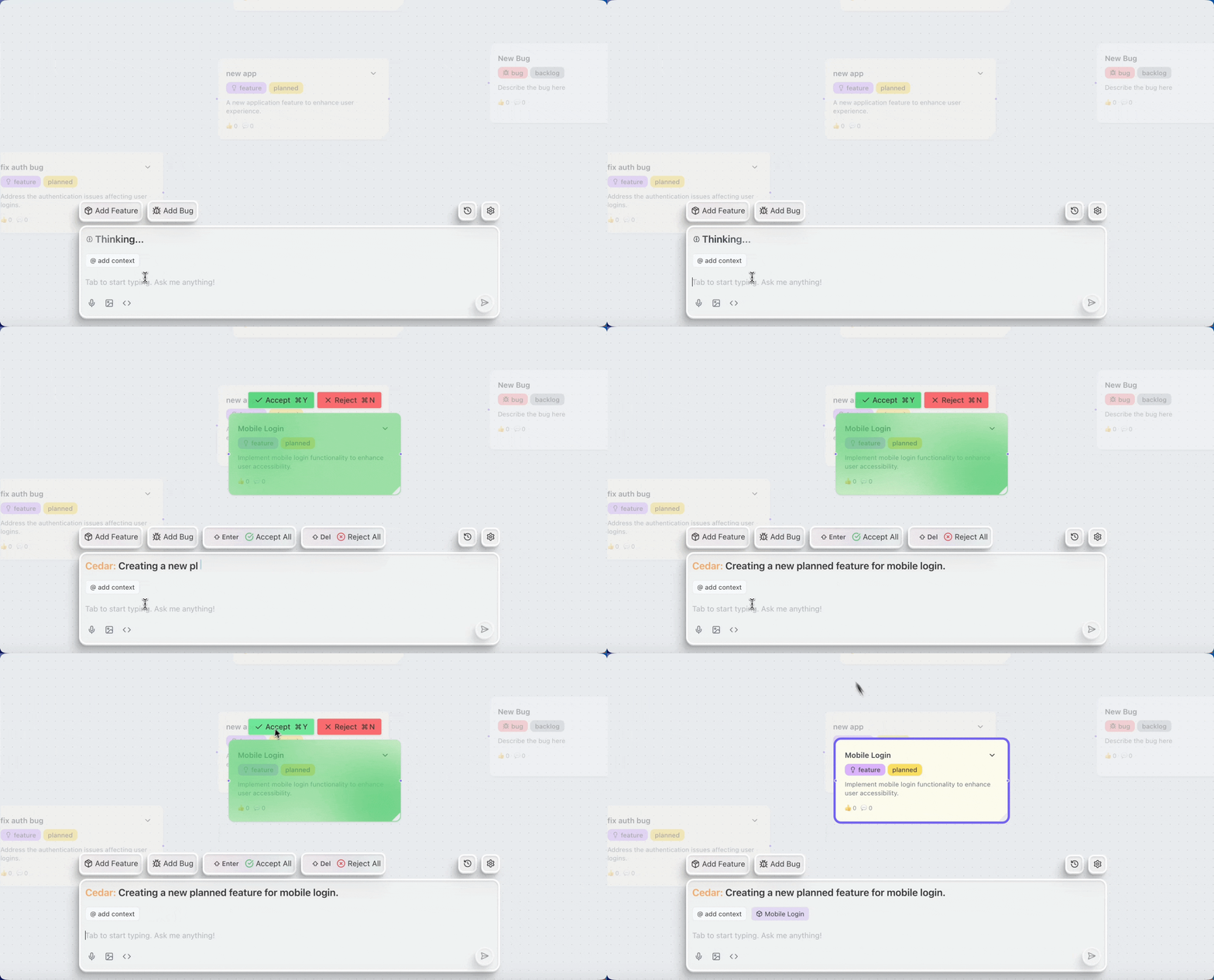
Cedar OS provides a powerful state diff management system that enables you to track changes, visualize differences, and give users control over accepting or rejecting modifications. This is particularly useful for AI-generated changes where users need to review and approve modifications before they’re applied.
Overview
The State Diff system provides:
Change tracking - Automatically track differences between old and new states
Visual diff markers - Add visual indicators to show what’s been added, changed, or removed
User control - Accept or reject changes individually or in bulk
History management - Undo/redo support with full history tracking
Custom computations - Transform states to add diff markers or other metadata
Quick Start
Basic Usage with useDiffState
The simplest way to use diff tracking is with the useDiffState hook, which works like React’s useState but with automatic diff tracking:
import { useDiffState } from 'cedar-os' ;
function MyComponent () {
const [ nodes , setNodes ] = useDiffState ( 'nodes' , initialNodes );
// Use it just like useState
const addNode = ( node ) => {
setNodes ([ ... nodes , node ]);
};
return (
< div >
{ nodes . map (( node ) => (
< NodeComponent key = {node. id } node = { node } />
))}
</ div >
);
}
Adding Visual Diff Markers
To visualize changes in your UI, use the computeState function to add diff markers:
import { useDiffState , addDiffToArrayObjs } from 'cedar-os' ;
function ProductRoadmap () {
const [ nodes , setNodes ] = useDiffState ( 'nodes' , initialNodes , {
description: 'Product roadmap nodes' ,
diffMode: 'holdAccept' , // Changes require explicit acceptance
computeState : ( oldState , newState ) => {
// Add 'diff' field to data property of changed items
return addDiffToArrayObjs ( oldState , newState , 'id' , '/data' );
},
});
return (
< div >
{ nodes . map (( node ) => (
< div
key = {node. id }
className = {node.data.diff ? `diff- ${ node . data . diff } ` : '' } >
{ node . data . title }
{ node . data . diff === ' added ' && < span >✨ New </ span >}
{ node . data . diff === ' changed ' && < span >📝 Modified </ span >}
</ div >
))}
</ div >
);
}
Diff Modes
Cedar OS supports two diff modes that control how changes are handled:
Changes are immediately visible to users but can be reverted: const [ state , setState ] = useDiffState ( 'myState' , initial , {
diffMode: 'defaultAccept' , // Changes applied immediately
});
Best for:
Real-time collaboration
Non-critical changes
Quick iterations
Changes are held in a pending state until explicitly accepted: const [ state , setState ] = useDiffState ( 'myState' , initial , {
diffMode: 'holdAccept' , // Changes require acceptance
});
Best for:
AI-generated content review
Critical data modifications
Approval workflows
Managing Diffs
Accepting and Rejecting Changes
Use useDiffStateOperations to access diff management functions:
import { useDiffState , useDiffStateOperations } from 'cedar-os' ;
function DiffManager () {
const [ data , setData ] = useDiffState ( 'data' , initialData );
const diffOps = useDiffStateOperations ( 'data' );
if ( ! diffOps ) return null ;
const { acceptAllDiffs , rejectAllDiffs , undo , redo } = diffOps ;
return (
< div >
< button onClick = { acceptAllDiffs } > Accept All Changes </ button >
< button onClick = { rejectAllDiffs } > Reject All Changes </ button >
< button onClick = { undo } > Undo </ button >
< button onClick = { redo } > Redo </ button >
</ div >
);
}
Individual Diff Management
For granular control over specific changes:
import { useCedarStore } from 'cedar-os' ;
function ItemDiffControls ({ itemId }) {
const { acceptDiff , rejectDiff } = useCedarStore ();
const handleAccept = () => {
// Accept changes for specific item in array
acceptDiff ( 'nodes' , '/nodes' , 'id' , itemId , [ '/data/diff' ]);
};
const handleReject = () => {
// Reject changes for specific item
rejectDiff ( 'nodes' , '/nodes' , 'id' , itemId , [ '/data/diff' ]);
};
return (
< div >
< button onClick = { handleAccept } > ✓ Accept </ button >
< button onClick = { handleReject } > ✗ Reject </ button >
</ div >
);
}
Advanced Usage
Custom State Setters
Define custom operations that work with diff tracking:
const [ nodes , setNodes ] = useDiffState ( 'nodes' , initialNodes , {
stateSetters: {
addNode: {
name: 'addNode' ,
description: 'Add a new node to the roadmap' ,
parameters: [{ name: 'node' , type: 'Node' , description: 'Node to add' }],
execute : ( currentNodes , setValue , node ) => {
setValue ([ ... currentNodes , node ]);
},
},
updateNode: {
name: 'updateNode' ,
description: 'Update an existing node' ,
parameters: [
{ name: 'id' , type: 'string' , description: 'Node ID' },
{ name: 'updates' , type: 'object' , description: 'Updates to apply' },
],
execute : ( currentNodes , setValue , { id , updates }) => {
setValue (
currentNodes . map (( node ) =>
node . id === id ? { ... node , ... updates } : node
)
);
},
},
},
});
Subscribing to Diff Values
Monitor specific fields within your diff state:
import { useSubscribeToDiffValue } from 'cedar-os' ;
function FieldMonitor () {
const { oldValue , newValue , hasChanges , cleanValue } =
useSubscribeToDiffValue ( 'formData' , '/user/email' );
if ( hasChanges ) {
return (
< div >
< p > Email changed from : { oldValue }</ p >
< p > To : { newValue }</ p >
< p > Current value : { cleanValue }</ p >
</ div >
);
}
return < p > Email : { cleanValue } </ p > ;
}
Using with AI Agents
Integrate diff tracking with AI-generated changes:
import { useDiffState , useCedarStore } from 'cedar-os' ;
function AIAssistedEditor () {
const [ content , setContent ] = useDiffState ( 'content' , '' , {
diffMode: 'holdAccept' ,
description: 'Document content for AI editing' ,
});
const { sendMessage } = useCedarStore ();
const requestAIEdit = async () => {
// AI will modify the state, changes will be tracked
await sendMessage ({
content: 'Improve this document' ,
stateContext: [ 'content' ], // Include current content
});
// Changes will appear with diff markers
// User can review and accept/reject
};
return (
< div >
< textarea value = { content } onChange = {(e) => setContent (e.target.value)} />
< button onClick = { requestAIEdit } > AI Enhance </ button >
</ div >
);
}
Best Practices
Use Descriptive Keys Choose meaningful, unique keys for your diff states to avoid conflicts and
make debugging easier.
Add Descriptions Provide clear descriptions for states and setters to help AI agents understand
your data structure.
Choose the Right Diff Mode Use holdAccept for critical changes and defaultAccept for non-critical
updates.
Clean Up Diff Markers Remember to handle diff markers in your UI components to provide visual
feedback.
Common Patterns
function EditableForm ({ initialData }) {
const [ formData , setFormData ] = useDiffState ( 'formData' , initialData , {
diffMode: 'holdAccept' ,
computeState : ( oldState , newState ) => {
// Add field-level diff tracking
const result = { ... newState };
Object . keys ( newState ). forEach (( key ) => {
if ( oldState [ key ] !== newState [ key ]) {
result [ ` ${ key } _changed` ] = true ;
}
});
return result ;
},
});
const diffOps = useDiffStateOperations ( 'formData' );
return (
< form >
{ /* Form fields */ }
< div className = 'form-actions' >
< button onClick = {diffOps?. acceptAllDiffs } > Save Changes </ button >
< button onClick = {diffOps?. rejectAllDiffs } > Cancel </ button >
</ div >
</ form >
);
}
Pattern 2: Collaborative Editing
function CollaborativeEditor () {
const [ document , setDocument ] = useDiffState ( 'document' , initialDoc , {
diffMode: 'defaultAccept' ,
description: 'Shared document for collaboration' ,
});
// Subscribe to specific sections
const titleDiff = useSubscribeToDiffValue ( 'document' , '/title' );
const bodyDiff = useSubscribeToDiffValue ( 'document' , '/body' );
return (
< div >
{ titleDiff . hasChanges && (
< div className = 'change-indicator' > Title was modified </ div >
)}
< h1 >{document. title } </ h1 >
{ bodyDiff . hasChanges && (
< div className = 'change-indicator' > Content was modified </ div >
)}
< div >{document. body } </ div >
</ div >
);
}
Troubleshooting
Changes not appearing with diff markers
Ensure you’re using a computeState function that adds diff markers: computeState : ( oldState , newState ) => {
return addDiffToArrayObjs ( oldState , newState , 'id' , '/data' );
};
Infinite loops when using setValue
Don’t call setValue directly in the component body. Use it in event handlers or effects: // ❌ Wrong
setValue ( newValue ); // Causes infinite loop
// ✅ Correct
const handleClick = () => {
setValue ( newValue );
};
State not syncing with UI
Make sure you’re using the state value returned by the hook, not a separate state variable: // ✅ Correct - use the state from useDiffState
const [ nodes , setNodes ] = useDiffState ( 'nodes' , initial );
// ❌ Wrong - don't maintain separate state
const [ nodes , setNodes ] = useDiffState ( 'nodes' , initial );
const [ localNodes , setLocalNodes ] = useState ( nodes ); // Don't do this
Next Steps