

The Zustand Store Structure
Cedar-OS uses Zustand as its core state management solution, organized into specialized “slices” that each handle different aspects of the system. This allows us to modularise and encapsulate functionality internally to modules.Core Slices Overview
AgentConnectionSlice - Handles all LLM communication and response processing
StateSlice - Allows agents to read and write to local react states
AgentContextSlice - Gathers and formats context (such as state) for AI consumption
MessagesSlice - Stores and renders chat messages
ToolsSlice - Manages frontend tool registration, execution, and lifecycle
Breaking down an end-to-end AI workflow with Cedar-OS
Let’s say you want to build this an AI-native email flow where you can say “Write a response” and have an AI agent compose a draft to respond to the currently opened email.Preparing the input
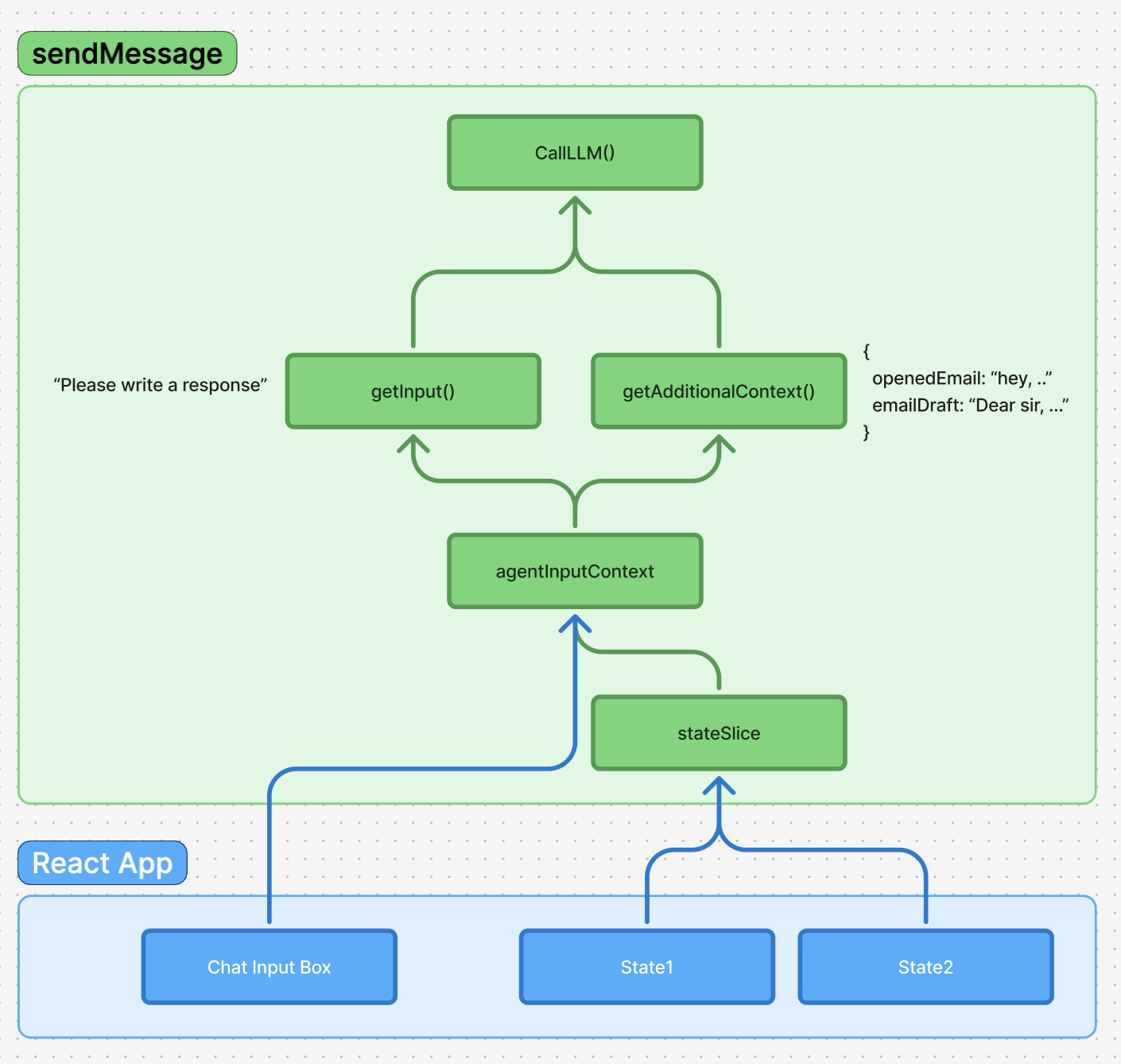
addMessage from messagesSlice to persist and add the user message to chat history.
3. Let agent read state through stateSlice
But now, how does the agent know what it’s supposed to write a response to? Our next step is to allow the agent to read from local states.
To do this, we have stateSlice which provides functions like registerState. This lets us register a state into a central place no matter where and how the local states are distributed.
4. agentContext
agentContext handles the context that we pass into the agent. It compiles the context & editor through stringifyInputContext and compileAdditionalContext and helps generally manage the context we’re giving the agent.
For example, it allows users to use @notation to mention a specific email or user through useStateBasedMentionProvider().
5. callLLM()
Now that we’ve pulled all the necessary context for the agent to execute its task effectively, we can pass it all in through the agentConnectionSlice which calls the LLM.
Handling the LLM response
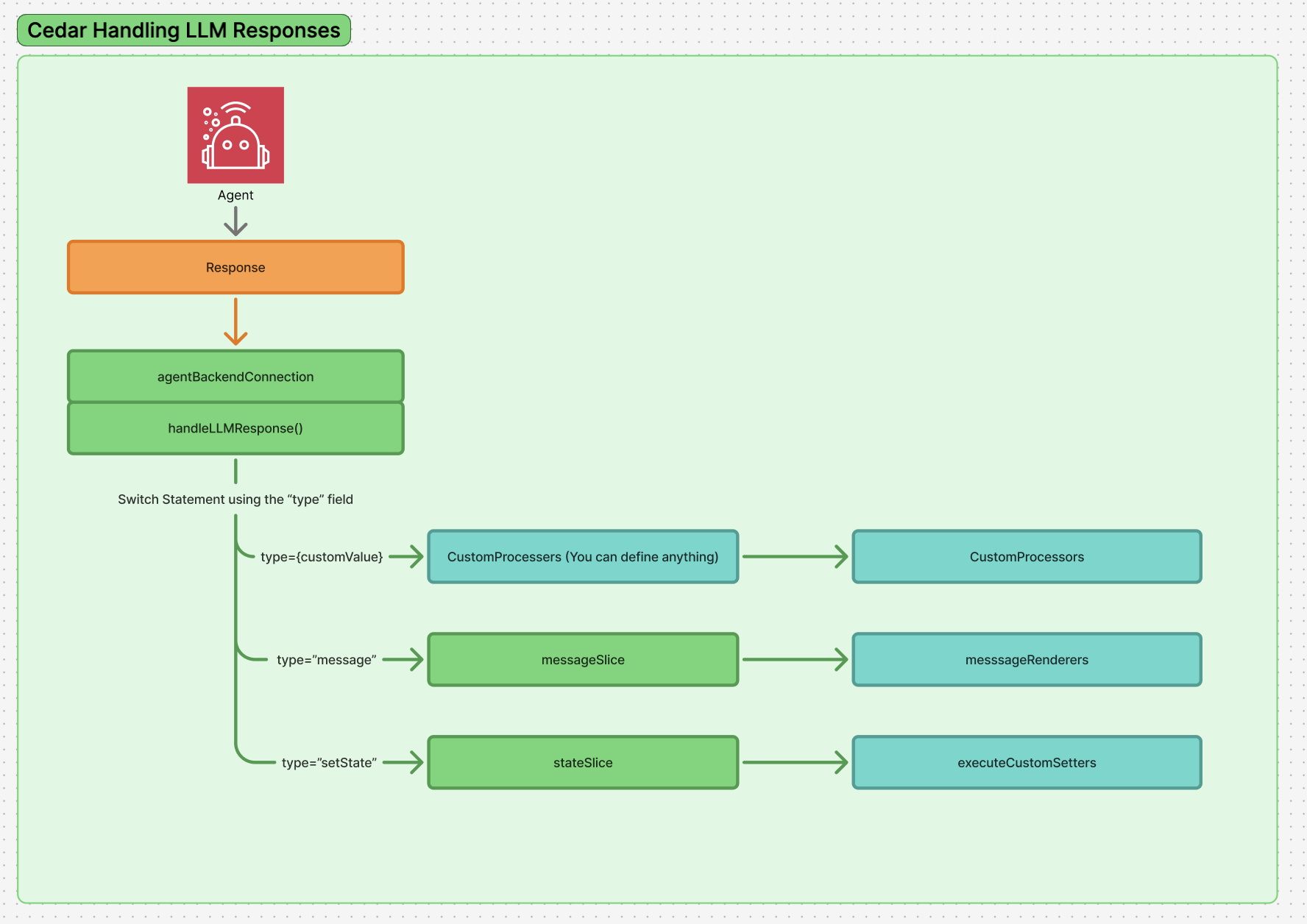
handleLLMResponse
When the LLM returns a response, it gets passed to handleLLMResponse() which processes an array of items that can be either strings (text content) or structured objects.
2. Type-based processing with response processors
The system uses a switch-like mechanism through processStructuredResponse() that looks at the type field of structured responses and routes them to registered response processors:
messagetype - Handled bymessageResponseProcessor, converts backend message format to chat messagessetStatetype - Handled bysetStateResponseProcessor, executes state mutations throughexecuteStateSetter()frontendTooltype - Handled byfrontendToolResponseProcessor, executes registered frontend toolsprogress_updatetype - Shows loading states and progress indicators
messagesSlice
Text content and processed messages get added to the chat history via addMessage() in the messagesSlice. This handles the display and persistence of conversation history.
4. State mutations through registered setters
For setState type responses, the system calls executeStateSetter() which uses the parameters from registerState() to execute the appropriate state setter function, allowing the AI to modify application state based on the registered schema and available setters.
For frontendTool type responses, the system calls executeFrontendTool() which validates arguments against registered Zod schemas and executes the appropriate tool function, enabling agents to interact with UI components and perform frontend actions.
Response Processors Deep Dive
Response processors handle different types of structured AI responses:Built-in Processors
- SetStateResponseProcessor - Executes state mutations via registered state setters
- MessageResponseProcessor - Adds text messages to chat
- FrontendToolResponseProcessor - Executes registered frontend tools with validation
- ProgressUpdateResponseProcessor - Handles loading states