

Documentation Index
Fetch the complete documentation index at: https://docs.cedarcopilot.com/llms.txt
Use this file to discover all available pages before exploring further.
The RadialMenuSpell component creates a beautiful circular menu that appears at the cursor position, perfect for providing quick contextual actions. It features smooth animations, visual feedback, and supports both keyboard and mouse activation.
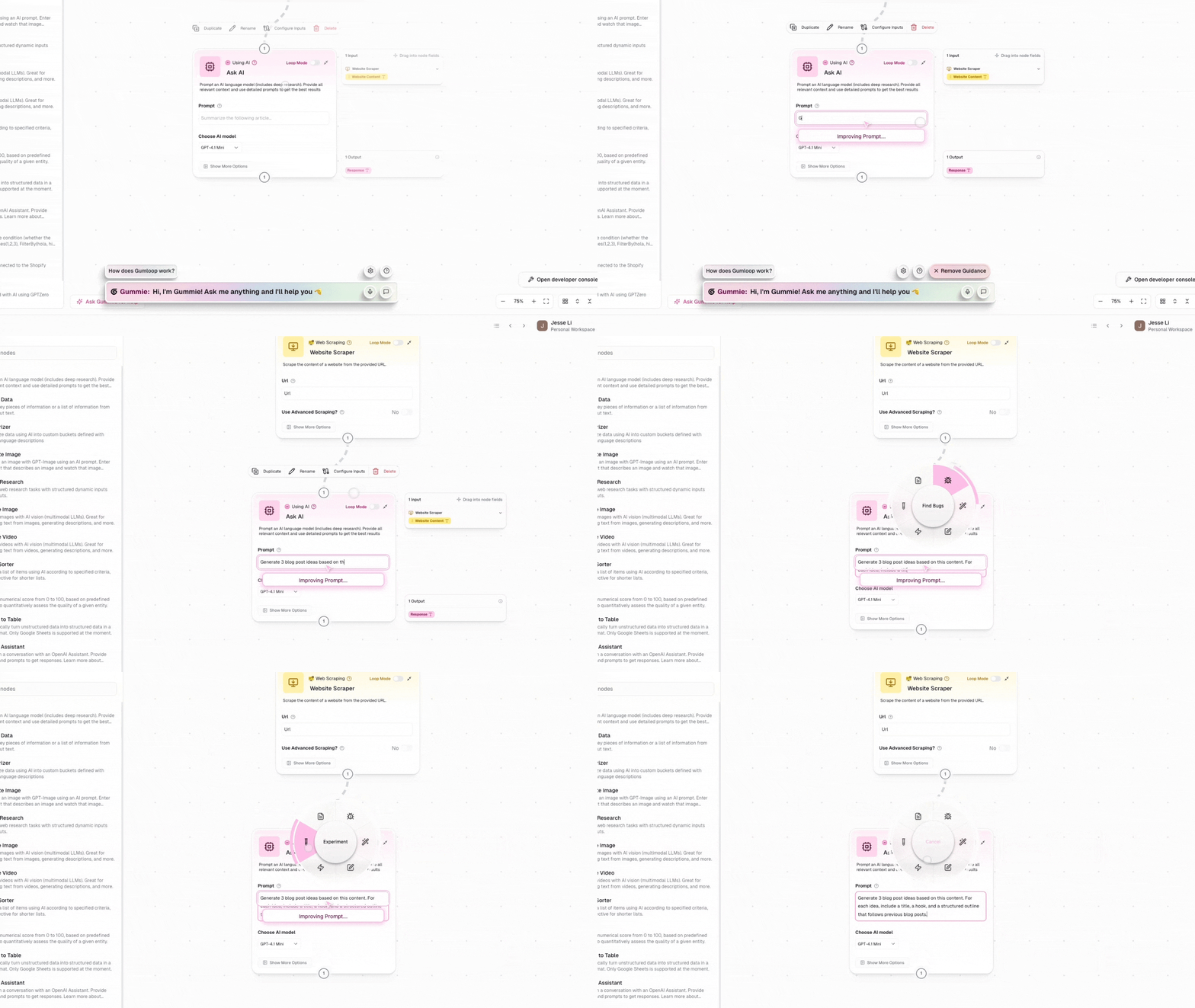
Features
- Circular Layout: Items arranged in a circle for equal access
- Visual Feedback: Animated hover states and selection indicators
- Cancel Zone: Center area for canceling without action
- Flexible Activation: Supports keyboard shortcuts and mouse events
- Hold-to-Select: Natural interaction pattern for quick actions
- Escape Support: Press ESC to cancel without executing
- Theme Integration: Adapts to Cedar’s light/dark mode
- Icon Support: Use emojis or Lucide icons for menu items
Installation
import { RadialMenuSpell } from 'cedar-os-components/spells';
Basic Usage
import {
RadialMenuSpell,
type RadialMenuItem,
} from 'cedar-os-components/spells';
import { MouseEvent, ActivationMode } from 'cedar-os';
import { Copy, Trash, Edit, Share } from 'lucide-react';
function MyComponent() {
const menuItems: RadialMenuItem[] = [
{
title: 'Copy',
icon: Copy,
onInvoke: (store) => {
// Access Cedar store for actions
console.log('Copy action');
},
},
{
title: 'Edit',
icon: Edit,
onInvoke: (store) => {
console.log('Edit action');
},
},
{
title: 'Share',
icon: Share,
onInvoke: (store) => {
console.log('Share action');
},
},
{
title: 'Delete',
icon: Trash,
onInvoke: (store) => {
console.log('Delete action');
},
},
];
return (
<RadialMenuSpell
spellId='my-radial-menu'
items={menuItems}
activationConditions={{
events: [MouseEvent.RIGHT_CLICK],
mode: ActivationMode.HOLD,
}}
/>
);
}
Props
| Prop | Type | Required | Description |
|---|
spellId | string | Yes | Unique identifier for this spell instance |
items | RadialMenuItem[] | Yes | Array of menu items to display |
activationConditions | ActivationConditions | Yes | Conditions that trigger the menu |
interface RadialMenuItem {
/** Display title (shown in center on hover) */
title: string;
/** Emoji string or Lucide icon component */
icon: string | LucideIcon;
/** Callback when item is selected */
onInvoke: (store: CedarStore) => void;
}
Activation Patterns
Hold Pattern (Recommended)
The most natural interaction for radial menus is the hold pattern:
activationConditions={{
events: [MouseEvent.RIGHT_CLICK],
mode: ActivationMode.HOLD
}}
User flow:
- Right-click and hold to open menu
- Move mouse to desired item (it highlights)
- Release to execute action
- Or move to center and release to cancel
Toggle Pattern
For persistent menus that stay open:
activationConditions={{
events: [Hotkey.SPACE],
mode: ActivationMode.TOGGLE
}}
User flow:
- Press Space to open menu
- Move mouse to select item
- Click to execute or press Space again to close
Keyboard Shortcut
Bind to any keyboard shortcut:
activationConditions={{
events: ['ctrl+e', 'cmd+e'],
mode: ActivationMode.HOLD
}}
Advanced Examples
Create an AI-powered context menu:
import { Sparkles, Brain, Wand2, Zap } from 'lucide-react';
const aiMenuItems: RadialMenuItem[] = [
{
title: 'Explain',
icon: Brain,
onInvoke: async (store) => {
const selection = window.getSelection()?.toString();
if (selection) {
await store.sendMessage({
content: `Explain this: ${selection}`,
role: 'user',
});
}
},
},
{
title: 'Improve',
icon: Sparkles,
onInvoke: async (store) => {
const selection = window.getSelection()?.toString();
if (selection) {
await store.sendMessage({
content: `Improve this text: ${selection}`,
role: 'user',
});
}
},
},
{
title: 'Summarize',
icon: Zap,
onInvoke: async (store) => {
await store.sendMessage({
content: 'Summarize the current conversation',
role: 'user',
});
},
},
{
title: 'Generate',
icon: Wand2,
onInvoke: (store) => {
// Open generation dialog
store.setSpellActive('generation-dialog', true);
},
},
];
Use emojis for a playful interface:
const emojiMenuItems: RadialMenuItem[] = [
{
title: 'Love it!',
icon: '❤️',
onInvoke: (store) => {
// Add reaction
},
},
{
title: 'Celebrate',
icon: '🎉',
onInvoke: (store) => {
// Trigger celebration
},
},
{
title: 'Question',
icon: '❓',
onInvoke: (store) => {
// Ask for clarification
},
},
{
title: 'Bookmark',
icon: '📌',
onInvoke: (store) => {
// Save for later
},
},
];
Generate menu items based on context:
function ContextualRadialMenu({ selectedElement }) {
const menuItems = useMemo(() => {
const items: RadialMenuItem[] = [];
if (selectedElement?.type === 'image') {
items.push({
title: 'Download',
icon: Download,
onInvoke: () => downloadImage(selectedElement),
});
items.push({
title: 'Edit',
icon: Edit,
onInvoke: () => openImageEditor(selectedElement),
});
}
if (selectedElement?.type === 'text') {
items.push({
title: 'Copy',
icon: Copy,
onInvoke: () => copyToClipboard(selectedElement.content),
});
}
// Add common items
items.push({
title: 'Share',
icon: Share,
onInvoke: () => shareContent(selectedElement),
});
return items;
}, [selectedElement]);
return (
<RadialMenuSpell
spellId='contextual-menu'
items={menuItems}
activationConditions={{
events: [MouseEvent.RIGHT_CLICK],
mode: ActivationMode.HOLD,
}}
/>
);
}
Visual Customization
The radial menu automatically adapts to Cedar’s styling system:
Theme Integration
The component uses Cedar’s styling context:
- Brand Color: Used for hover states and selection
- Dark Mode: Automatically adjusts colors and contrasts
- Text Colors: Adapts based on theme
Layout Constants
The component uses these layout constants (defined in the component):
const MENU_RADIUS = 100; // Radius of the menu circle
const INNER_RADIUS = 50; // Cancel zone radius
const INNER_GAP = 4; // Gap between zones
const OUTER_PADDING = 10; // Outer padding
const BORDER_STROKE_WIDTH = 8; // Ring thickness
Interaction Details
Mouse Behavior
- Hover: Moving mouse over items highlights them
- Center Zone: Moving to center shows “Cancel”
- Selection: Release (hold mode) or click (toggle mode) to select
- Visual Feedback: Animated ring shows current selection
Keyboard Support
- ESC: Cancel without executing any action
- Activation Keys: Defined by
activationConditions
Position Handling
- Mouse Events: Menu appears at cursor position
- Keyboard Events: Menu appears at viewport center
- Smart Positioning: Stays within viewport bounds
Best Practices
1. Limit Item Count
Keep menus focused with 3-8 items:
// ✅ Good: Focused set of actions
const items = [
{ title: 'Edit', icon: Edit, onInvoke: handleEdit },
{ title: 'Share', icon: Share, onInvoke: handleShare },
{ title: 'Delete', icon: Trash, onInvoke: handleDelete },
];
// ❌ Avoid: Too many items
const items = [
/* 12+ items */
]; // Hard to navigate quickly
2. Use Clear Icons
Choose recognizable icons:
// ✅ Good: Clear, standard icons
{
icon: Copy;
} // Universal copy icon
{
icon: '📋';
} // Clear emoji
// ❌ Avoid: Ambiguous icons
{
icon: Circle;
} // What does this do?
{
icon: '🔮';
} // Unclear meaning
3. Consistent Actions
Keep onInvoke callbacks focused:
// ✅ Good: Single responsibility
onInvoke: (store) => {
const data = prepareData();
store.sendMessage({ content: data, role: 'user' });
};
// ❌ Avoid: Multiple unrelated actions
onInvoke: (store) => {
updateUI();
saveToDatabase();
sendAnalytics();
showNotification();
};
4. Handle Errors Gracefully
onInvoke: async (store) => {
try {
await performAction();
} catch (error) {
store.addMessage({
content: 'Action failed. Please try again.',
role: 'system',
});
}
};
Accessibility Considerations
While the radial menu is primarily a visual component, consider these accessibility aspects:
- Alternative Activation: Provide keyboard shortcuts as alternatives
- Clear Labels: Use descriptive titles for screen readers
- Escape Route: Always allow ESC key to cancel
- Visual Contrast: The component respects Cedar’s theme for proper contrast
- Singleton Management: Uses Cedar’s spell system for efficient event handling
- Animation Performance: Uses CSS transforms for smooth animations
- Memory Efficient: Automatically cleaned up when component unmounts
- Event Delegation: Single set of listeners for all instances
Common Patterns
const tools = [
{ title: 'Select', icon: MousePointer },
{ title: 'Draw', icon: Pencil },
{ title: 'Erase', icon: Eraser },
{ title: 'Text', icon: Type },
];
const navigation = [
{ title: 'Home', icon: Home },
{ title: 'Search', icon: Search },
{ title: 'Settings', icon: Settings },
{ title: 'Profile', icon: User },
];
const mediaControls = [
{ title: 'Play', icon: Play },
{ title: 'Pause', icon: Pause },
{ title: 'Next', icon: SkipForward },
{ title: 'Previous', icon: SkipBack },
];
Troubleshooting
- Check that the spell ID is unique
- Verify activation conditions are correct
- Ensure component is mounted
Items not executing
- Verify
onInvoke callbacks are defined
- Check for errors in callback functions
- Ensure Cedar store is accessible
Visual issues
- Component adapts to Cedar’s theme automatically
- Check that Cedar styling context is provided
- Verify Container3D component is available